Choosing an industrial PC comes down to more than reliability and performance. The right system has to suit the environment it’s going into, connect to your existing equipment and run your software without issues. This guide walks through the key things to check before you buy.
If you already know what you need, you can go straight to our industrial PC range to compare models.
Why a Standard PC Won’t Survive an Industrial Environment
If you are new to this type of machine, an industrial PC has quite a lot in common with a personal computer (PC). These types of computers are typically found in homes and workplaces. You might even be reading this guide on one right now!
The key difference is that an industrial PC is specifically designed to work reliably and efficiently in harsh environments. If you’d like the full background first, our guide to what an industrial PC is explains how they differ from standard PCs and where they’re used.
As you can probably guess, a typical PC wouldn’t fare very well on a factory floor. There’s high temperatures, dust, debris, and all sorts of environmental factors that could cause breakdowns, low availability, and performance issues. And with modern-day industrial systems that rely on computers, a regular PC just isn’t up to the job.
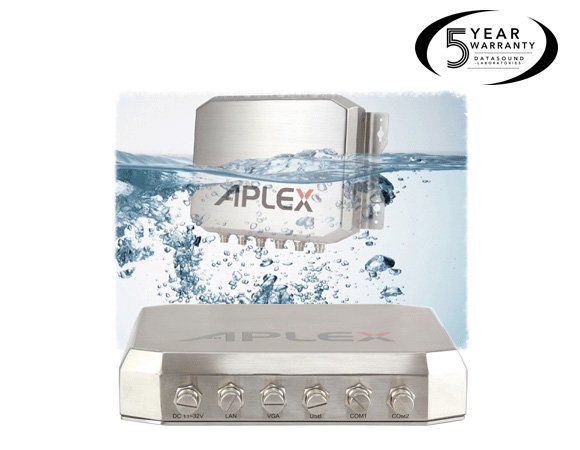 One of the first things you’ll notice with an industrial PC is what they’re made from. These are typically strong and resilient materials that can survive challenging environments. Think metals like aluminium and/or steel. This is particularly important for an industrial computer’s outer enclosure, as this will bear the brunt of the majority of an industrial environment’s conditions.
Another benefit of these types of materials is how they enable industrial PCs to function in a wide temperature range. They can withstand both high and low temperatures, ensuring consistent operation even in extreme environmental conditions. This is especially important in industry workspaces like manufacturing plants, where things can get really heated.
Along with the heat is the dust, debris, and moisture in an industrial setting. You’ll notice on a lot of industrial PCs that they have something called an IP rating. This stands for Ingress Protection, and indicates how resistant the enclosure is to water and dust, all things that could easily damage a computer. These conditions can be further exaggerated by the vibrations and shocks that machinery and equipment give off. Industrial PCs are designed to withstand all of this, making sure systems operate without interruptions and, most importantly, don’t fail.
An industrial PC isn’t the only option for harsh environments. Depending on the application, one of these may suit you better:
- Panel PCs – if you need a built-in touchscreen
- Rugged tablets – if the system needs to be portable
- Rugged laptops – for field work away from a fixed station
- Single board computers – for embedding inside equipment
- Industrial displays – if you already have a PC and just need a rugged screen
 What to Check When Comparing Models
Once you’ve established that an industrial PC is the right fit, the next step is working out which model suits your application. Start with these questions:
Will it deliver what your operations need?
Are there other models that are better suited for the job?
Here’s what to check for each one.
Look For Robust and Durable Construction
As mentioned earlier, industrial settings can be intense – equipment and machines can be exposed to extremes in temperature, humidity, dust, debris, vibration, and electrical noise. To operate reliably in these conditions and avoid corrosion, an industrial PC should have a sturdy construction with high-quality components. Many models also use fanless and cableless designs to further prolong their life cycles, such as the fanless box PCs in our range. In the long term, a longer lasting system saves you money on replacements and downtime.
Assess Temperature and Environmental Specifications
Double check that the temperature range of an industrial PC is suited to the space you want it to operate in. We recommend looking for models with wide temperature ranges to accommodate extreme hot and cold. Remember to check the IP (Ingress Protection) rating too. As mentioned above, this indicates the level of protection against debris and water. If you’ve got a particularly moist or dusty workspace, you want something that’ll handle these conditions.
Are There Suitable Expansion and Connectivity Options?
Keep in mind what your existing industrial applications need to connect to other systems, as well as potential expansion plans. For example – if you need to allow additional cards or modules for specialised functionality, you’ll need industrial PCs with numerous expansion slots. You’ll want to ensure that the model you’re interested in has USB, Ethernet, serial ports, and/or wireless communication options. Otherwise, it’ll become tricky to integrate it with your existing hardware and computer systems.
Is the Processing Power and Performance Suitable?
Examine the industrial PC’s processing power and performance capabilities. Is this in line with what your systems need? To ensure there’s adequate processing power for your particular job, take into account variables such as the CPU type, clock speed, number of cores, and accessible memory (RAM).
Is the Operating System Compatible?
This is an important one! You’ll want to ensure that the industrial PC is compatible with the operating system you use – or want to use – for your applications. Check for support and drivers for your preferred operating system, whether it’s a Windows-based, Linux, or another specialised industrial operating system.
You’ll also want to ensure that the industrial PC you choose provides the processing power, RAM requirements, and storage your application(s) need(s). You’ll want it to handle your workloads, even improve on how effectively they process them.
Ready to Compare Models?
Once you know your environment, performance and connectivity requirements, browse our industrial PCs to compare processors, I/O and mounting options side by side. Every unit is backed by a minimum 5-year operational guarantee.
Not sure which model fits your application? Get in touch and our in-house engineers will help you work it out.